Dash Cam Guide: Why It’s a Must for Business Fleets
A dash cam (dashboard camera) continuously records video while your vehicle is operating. For businesses managing fleets, delivery teams, or company cars, dash cams are no longer a “nice-to-have” it’s essential.
Dash cam protects your drivers, defends your business in insurance claims, and give you real visibility into what’s happening on the road.
This Dash Cam Guide explains what dash cams are, how they work, and why they’re critical for businesses in 2025. You’ll learn how to install them, prevent battery drain, choose the right model, and calculate ROI from fewer claims and better driver performance.
Who Benefits from Dash Cams?
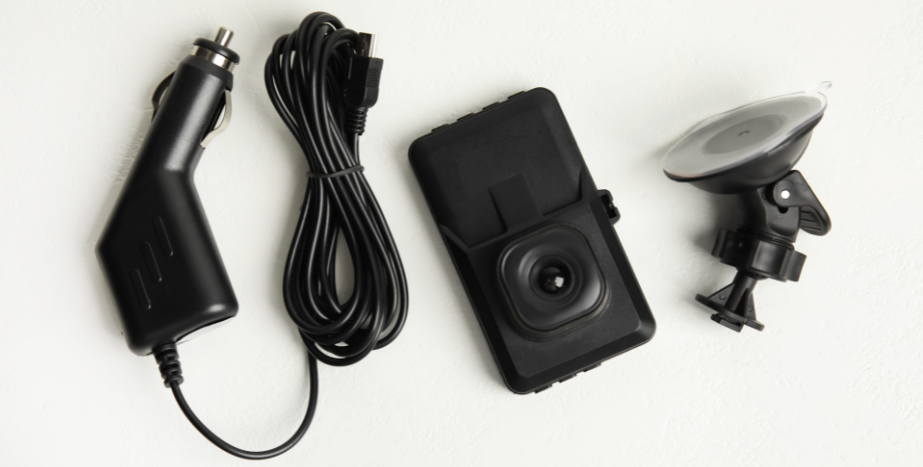
If your business relies on vehicles, whether it’s five service vans or a 500-truck fleet, a dash cam isn’t a gadget, it’s insurance for your bottom line.
Modern dashboard cameras do more than just record the road ahead, even capture detailed footage that can make or break an insurance claim, protect professional drivers, and give you real data to improve operations.
1. Protect Your Business with Video Evidence
When an incident occurs, the recorded footage from a dash cam can mean the difference between a quick settlement and months of legal headaches.
- Clear, Full HD or 4K video resolution shows road signs, license plates, and road users with precision.
- Wide-angle lenses and rear cameras provide complete coverage, front, side, and cabin view.
- That’s undeniable proof in the event of a false claim or traffic dispute.
2. Encourage Driver Accountability
With dash cams mounted inside vehicles, your team knows that every mile matters.
- Loop recording ensures you always capture the latest footage without running out of storage space.
- Smart features like GPS tracking, speed data, and Wi-Fi access give you instant visibility.
- You’re not “watching”, you’re building a safer, more responsible driving culture.
3. Strengthen Your Insurance Position
While many dash cams don’t yet trigger automatic discounts, they prevent costly claims by providing clear evidence.
Insurers are moving toward telematics-based rewards in 2025, and fleets with video footage and data reference points are already ahead of the curve.
4. Gain Operational Insight
Video and GPS data highlight risky patterns, speeding, harsh braking, or unsafe routes.
This isn’t surveillance; it’s strategy. Use those insights to coach drivers, optimize routes, and protect your vehicle’s security every day.
2025 stat: Businesses using dash cams saw a 40% drop in accident-related claims and 25% faster resolution times (FleetNews, 2024).
Is Installing a Dash Cam Difficult?
Not at all, and that’s part of the reason so many businesses are rolling out dash cams across entire fleets in days, not weeks.
Today’s dashboard cameras are designed for fast, clean installs, no engineering degree required. Whether you’re mounting a front dash cam, a rear dash cam, or a dual-view system with GPS tracking and smart features, setup takes about 20 minutes per vehicle.
Option 1: 12V Power Installation
If you need flexibility, plug-and-play is the way to go.
- Simply mount the camera behind the rearview mirror on the front windshield to capture footage of the road ahead.
- Connect it to your vehicle’s 12V power outlet or USB port, and you’re live.
- Perfect for short-term drivers, leased vehicles, or test pilots.
Because loop recording automatically overwrites older video footage, you’ll never run out of space, just add a quality SD card or memory card for continuous operation.
Option 2: Hardwiring for Permanent Use
For fleets that run daily, hardwiring is the smart move.
- The camera connects directly to the fuse box or external power source, keeping the system powered even in parking mode.
- No dangling cords. No power interruptions. Just reliable recording every mile.
- Ideal for professional drivers who rely on consistent, high-quality footage to protect their business.
Where Should You Mount a Dash Cam?
Placement isn’t just about visibilityl it’s about capturing the right data when it matters most.
For business fleets, the goal is complete coverage without cluttering the driver’s line of sight. The right setup delivers clear, detailed footage for every incident, claim, or safety review, all while staying compliant with visibility laws.
1. Windshield Mount: The Gold Standard
The most effective and compliant spot for most dash cameras is on the front windshield, directly behind the rearview mirror.
- This central position offers a wide-angle lens view of the road ahead and keeps the camera discreet and stable.
- Full HD or 4K video resolution ensures every license plate, road sign, and driving event is recorded with excellent video quality, even at highway speeds.
- When combined with night vision and parking mode, your vehicle’s security is always on, day or night.
2. Dual-View Dash Cams: Full Visibility, Front to Back
For professional drivers and fleet operators, dual dash cams (front + cabin or front + rear) deliver complete coverage.
- The front-facing cam captures the road users and road ahead, while the rear camera records inside the cabin view or traffic behind.
- These systems are perfect for driver coaching, liability protection, and performance monitoring, offering both video footage and GPS tracking data in one feed.
- Many models also feature Wi-Fi or Bluetooth connectivity for instant uploads or unlimited cloud storage — so every critical second of footage is safely archived.
3. Rear-View Mirror Mount: Simple, Secure, and Smart
A newer generation of dash cams mounts directly to your rearview mirror, keeping the unit out of sight but always on duty.
- No extra clutter, no blocked vision.
- The mirror display can show a live rear dash cam feed, helping drivers back up safely while continuing to record footage of any incident that occurs.
- Many mirror-mounted models include smart features like touchscreen displays, voice control, and auto-adjusting brightness for seamless daily use.
Will a Dash Cam Drain the Battery?
Only if it’s installed wrong, or if you’re using the wrong power setup for your fleet.
Most dash cams today are built smart. They know when your engine’s off, your vehicle’s security is on, and when to power down or switch to a backup external power source. But understanding how power works is key to getting continuous, reliable footage without a dead battery surprise.
The Reality of Power Draw
When your dashboard camera stays active in parking mode, it’s designed to capture footage of any motion or impact while the engine’s off. That’s great for protecting your assets, but it also means the cam is still drawing power.
That’s where the right installation strategy and power management setup pay off.
Option 1: Dedicated Dash Cam Battery Pack
If you want 24/7 coverage, add a dash cam battery pack, a small, efficient external power source that keeps recording when the engine shuts off.
- Prevents battery drain by separating the camera’s power draw from the car’s primary battery.
- Supports loop recording, night vision, and AI-driven parking event detection without risk.
- Perfect for professional drivers, delivery fleets, or vehicles parked in high-traffic or high-risk areas.
Option 2: Smart Power Management
Many modern fleet dash cams include smart features that automatically power down when voltage drops below safe levels, or activate only when motion is detected.
- Look for AI-based sleep modes that wake the cam only when something happens.
- Combine with Wi-Fi or cloud backup to upload recorded footage instantly, even if the vehicle’s offline.
- Some rear cameras can even switch to standby when the front windshield camera is idle, saving more power.
Can Dash Cams Lower Insurance Costs?
Short answer: not officially yet. But the numbers don’t lie.
While most U.S. insurers don’t formally offer dash cam discounts, that’s changing fast. Major commercial carriers like Progressive and Nationwide are already piloting telematics-based programs that reward businesses using dash cams and GPS tracking for fleet safety and transparency.
And here’s the kicker, even without an official discount, dash cams already pay for themselves many times over.
How Dash Cams Cut Real Costs
- Faster claim resolution: When an incident occurs, clear recorded footage eliminates guesswork. Adjusters and investigators rely on video evidence, not conflicting driver stories.
- Fraud prevention: False or exaggerated claims can drain thousands in wasted premiums and downtime. Detailed footage from a full HD camera or dual-view system protects your business from opportunistic drivers and “staged” collisions.
- Improved risk profile: Many insurers now consider video footage and driving data as proof of lower risk. Consistent safe-driving behavior backed by smart features like speed tracking and loop recording demonstrates a proactive safety culture, the kind that wins better renewal terms.
ROI
A single dash cam investment say, a $250 dual-view model with wide-angle lens, night vision, and unlimited cloud storage, can protect your company from $5,000+ in potential claim losses after one accident.
Scale that across 10 vehicles, and the ROI compounds fast.
Need Expert Help Selecting the Right Dash Cam?
Choosing the right dash cam isn’t just about picking a model, it’s about protecting your business from risk, waste, and guesswork. That’s where BrickHouse GPS comes in.
For more than 20 years, we’ve helped business owners, fleet managers, and professional drivers find the best dash cams for their operations, no contracts, no hidden fees, and no tech jargon. Just straight talk, proven results, and real people ready to help.
Why Businesses Choose BrickHouse GPS
We’re not another online seller pushing “top-rated gadgets.” We’re a trusted GPS and video telematics partner built to serve fleets that run on accountability and uptime.
Here’s how we help you win:
- Get expert recommendations: We match you with the best dash cam setup, whether you need dual-view coverage, rear dash cams, or smart features like AI-based parking mode, GPS tracking, and Wi-Fi uploads.
- Simplify installation: From 12V power installs to hardwired systems, our team helps you deploy across your fleet without disrupting daily routes.
- Stay supported for life: Access real human support, not bots. Whether you need help reviewing recorded footage, troubleshooting cloud uploads, or scaling your deployment, we’re here before and after the sale.
No hold music. No contracts. Just support that performs as well as our cameras.
Ready to See What’s Possible?
Talk to a BrickHouse fleet specialist today. Let’s get your vehicles protected, your drivers covered, and your ROI on track.
Talk to a fleet specialist → Contact BrickHouse GPS
Recommended Business-Grade Dash Cams
Not all dash cams are built for business. The right system delivers crystal-clear footage, seamless integration, and reliability your fleet can count on, mile after mile.
At BrickHouse GPS, we test and recommend only professional-grade dash cameras designed for 24/7 operation, high-definition clarity, and enterprise-level support.
VizTrack RoadView Dash Cam
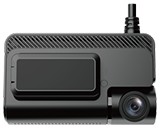
Compact doesn’t mean compromise. The VizTrack roadview is a single-view dash cam built for professional drivers who want reliability without complexity.
- Records in Full HD video resolution with wide-angle lens coverage to capture every license plate, road sign, and road user in view.
- Night vision and loop recording ensure uninterrupted detail, day or night.
- Quick to install on the front windshield with power from your 12V outlet or a hardwired connection.
Ideal for service fleets, sales reps, and small businesses that want dependable vehicle security without over-engineering.
VizTrack Dual-View Dash cam

For teams that demand complete visibility, the VizTrack Dual-View system delivers.
- Dual-lens setup captures both the road ahead and cabin view for accountability and safety.
- Smart features include GPS tracking, Wi-Fi connectivity, and optional unlimited cloud storage for instant access to recorded events.
- Designed for fleet operators who need detailed footage and proof on demand when an incident occurs.
With excellent video quality, AI-assisted motion detection, and durable construction, this unit outperforms many dash cams in its class.
FAQs: Dash Cam Guide for Businesses
Are dash cams legal for commercial fleets?
Yes. Dash cams are legal in all U.S. states, though placement laws differ. Always mount behind the rearview mirror or high on the front windshield to avoid obstructing vision. Some states regulate audio recording, so confirm local compliance before enabling sound.
Can dash cams record audio?
They can, but laws vary by state. In some areas, recording inside the cabin view or capturing conversations requires driver or passenger consent. BrickHouse GPS can help you choose compliant dash cameras for your region.
How much storage does a dash cam need?
A 64GB SD card stores roughly 6–8 hours of Full HD footage, depending on settings. Most dash cams feature loop recording, automatically overwriting older video footage to save new detailed footage. For fleets, consider unlimited cloud storage — it secures your evidence and makes retrieval easy.
What’s the best dash cam for a fleet?
For multi-vehicle operations, the best option is a dual dash cam or cloud-connected system with GPS tracking and smart features like AI motion detection, night vision, and wide-angle lenses. These deliver complete coverage, protect vehicle security, and maximize ROI with actionable data.
Can I monitor my fleet remotely?
Yes. Cloud-based dash cams allow live viewing, event alerts, and recorded footage retrieval from any smartphone or desktop. Many include Wi-Fi connectivity, Bluetooth access, and real-time GPS tracking, so you’re never guessing where your vehicles are or what’s happening on the road.
How long do dash cams last?
Quality dash cams are built for endurance. Expect an average lifespan of 3–5 years with proper care, firmware updates, and occasional SD card replacements. Business-grade models with rugged mounts and heat-resistant housing last even longer in demanding conditions.
What’s the typical dash cam ROI timeline?
Most fleets see measurable returns within 3–6 months of deployment, through fewer accident-related claims, faster investigations, and improved driver performance. For many, one piece of recorded footage can offset the full cost of installation.